Plot
Plot module have three submodules.
FW (Feature weights)
cor (Feature Correlation (cor) analysis)
IFS (Incremental feature selection curves)
SHAP (shap values summary)
waterfall (Feature waterfall based on shap values)
beeswarm (Feature beeswarm based on shap values of specific category)
PCA (Principal component analysis)
CM (Confusion matrix)
Feature Weights (FW)
FW module shows the feature selection method to plot the contribution of each feature.
Parameters |
Optional |
Descripton |
-i, —input |
filename path |
Feature importance dataframe path (CSV format) |
—format |
png, pdf |
Picture format |
-n, —number |
int (default=50) |
Number of features shown in the picture |
-o, —output |
directory |
output directory (default:Current directory) |
FW example
# If you do not have a dataframe of feature importances,
# Please run $Feature_scML fs -i example.csv -m fscore
$Feature_scML plot FW -i example_fscore.csv
# get example_fscore_FeatureWeight.png in the current directory.
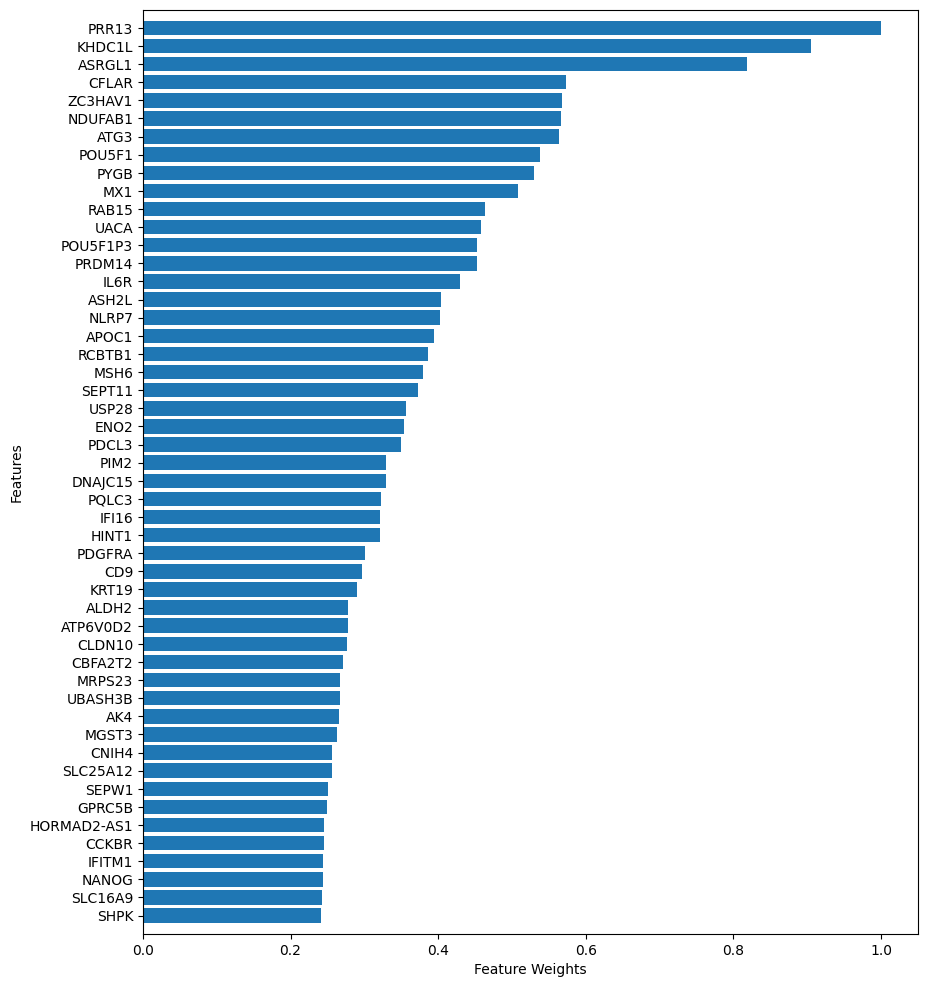
example_fscore_FeatureWeight.png
Feature Correlation (cor) analysis
cor module shows the feature correlation based on pearson, spearman, or kendall method to plot the correlation of every two features.
Parameters |
Optional |
Descripton |
-i, —input |
filename path |
Feature dataframe path (CSV format) |
-m, —method |
pearson,spearman,kendall |
correlation measure |
—format |
png, pdf |
Picture format (default=png) |
-n, —feature_number |
int (default=10) |
Number of top-ranked features shown in the picture |
-o, —output |
directory |
output directory (default:Current directory) |
cor example
# If you do not have a dataframe of feature importances,
# Please run $Feature_scML fs -i example.csv -m fscore
$Feature_scML plot cor -i example_fscore_data.csv -m pearson -n 10
# get pearson_correlation_example_fscore_data_10.png in the current directory.
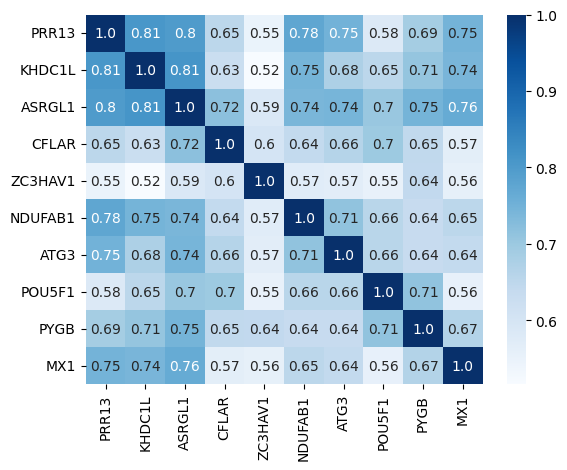
pearson_correlation_example_fscore_data_10.png
Incremental Feature Selection (IFS) Curves
IFS (incremental feature selection curves) evaluates the classification performance of the top-k-ranked features iteratively for k ∈ (1, 2, …, n), where n is the total number of features.
Parameters |
Optional |
Descripton |
-i, —input |
filename path |
IFS dataframe path (CSV format) |
—format |
png, pdf |
Picture format |
-o, —output |
directory |
output directory (default:Current directory) |
IFS example
# If you do not have a dataframe of incremental feature classification performance,
# Please run $Feature_scML automl -i example.csv -c svm -m fscore --njobs 20
$Feature_scML plot IFS -i 10-100_fscore_SVM_accuracy.csv
# get 10-100_fscore_SVM_accuracy_IFS.png in the current directory.
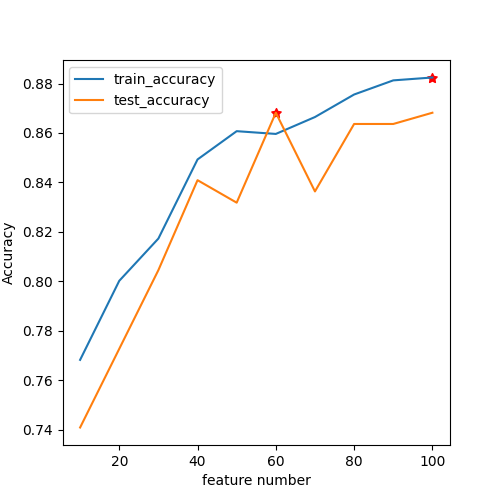
10-100_fscore_SVM_accuracy_IFS.png
SHAP
SHAP shows each feature of shap values for all categories.
Parameters |
Optional |
Descripton |
-i, —input |
filename path |
dataframe path (CSV format) |
—format |
png, pdf |
Picture format |
—model_path |
filename path |
Model file path (joblib) |
–classifier |
svm,rf,lr |
classifier name |
-n, —feature_number |
int |
Consistent with the number of features trained by the model |
-o, —output |
directory |
Output directory (default:Current directory) |
SHAP example
# If you do not have a dataframe of incremental feature classification performance,
# Please run $Feature_scML automl -i example.csv -c rf -m fscore --njobs 20
$Feature_scML plot SHAP -i example.csv -c rf -n 100 --model_path example_rf.joblib
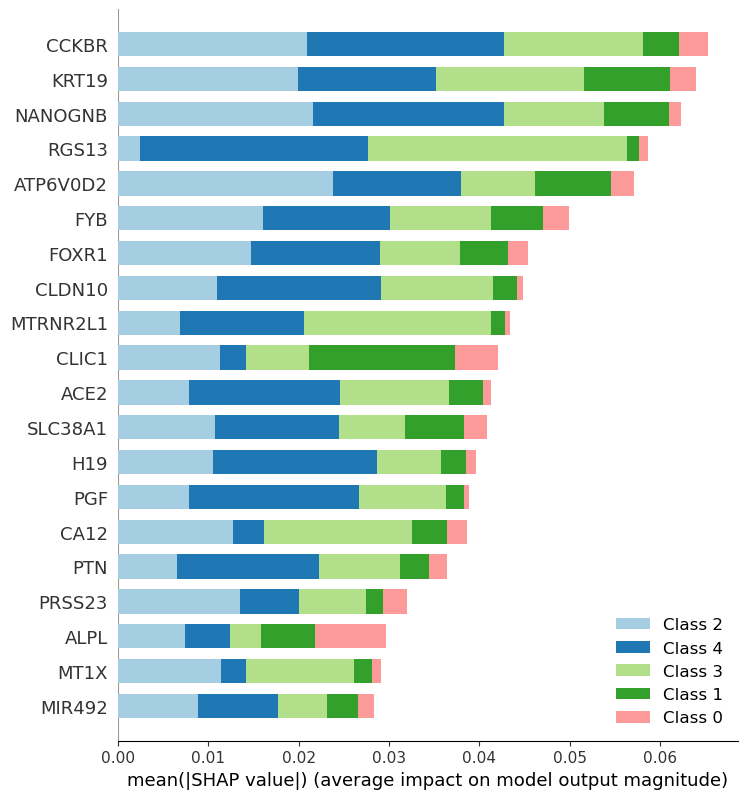
example_rf_100_SHAP_feature_summary.png
waterfall
waterfall (Feature waterfall based on shap values) shows each feature of shap values for a specific sample.
Parameters |
Optional |
Descripton |
-i, —input |
filename path |
dataframe path (CSV format) |
—format |
png, pdf |
Picture format |
—model_path |
filename path |
Model file path (joblib) |
—method |
svm |
Model name |
-n, —feature_number |
int |
Consistent with the number of features trained by the model |
-o, —output |
directory |
Output directory (default:Current directory) |
waterfall example
# Feature_scML automl -i example.csv -c svm -m fscore --njobs 20 --getmodel True
$Feature_scML plot waterfall -i example_fscore_data.csv --model_path example_20_svm.joblib -s 0 -n 20

example_fscore_data_simple_feature_contribute.png
beeswarm
The beeswarm plot shows an information-dense summary of how the top features in a dataset impact the model’s output.
Parameters |
Optional |
Descripton |
-i, —input |
filename path |
dataframe path (CSV format) |
—format |
png, pdf |
Picture format |
—model_path |
filename path |
Model file path (joblib) |
—method |
svm |
Model name |
-n, —feature_number |
int |
Consistent with the number of features trained by the model |
-s, —sample_label |
int |
label category to(0, 1, …) |
-o, —output |
directory |
Output directory (default:Current directory) |
beeswarm example
# Feature_scML automl -i example.csv -c svm -m fscore --njobs 20 --getmodel True
# Evaluate the summary shap value of all samples with a strategy of 1.
$Feature_scML plot beeswarm -i example_fscore_data.csv --model_path example_20_svm.joblib  -n 20 -s 1

example_fscore_data_simple_feature_summary.png
Principal Component Analysis (PCA)
The PCA plot shows the influence of different feature clustering on sample clustering.
Parameters |
Optional |
Descripton |
-i, —input |
filename path |
dataframe path (CSV format) |
—format |
png, pdf |
Picture format |
-n, —feature_number |
int |
feature number |
-o, —output |
directory |
Output directory (default:Current directory) |
PCA example
$Feature_scML plot PCA -i example_fscore_data.csv -n 100
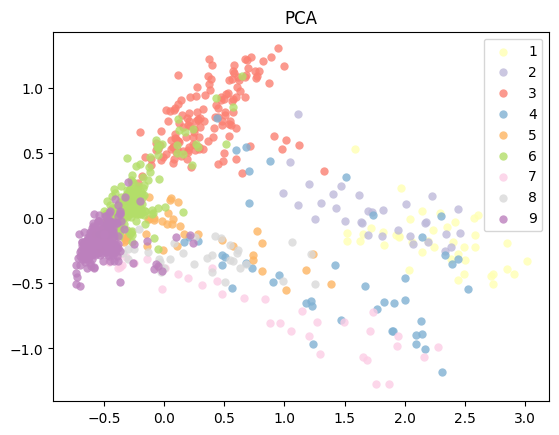
example_fscore_data_100_PCA.png
T-distributed Stochastic Neighbor Embedding (T-SNE)
The T-SNE plot shows the influence of different feature clustering on sample clustering.
Parameters |
Optional |
Descripton |
-i, —input |
filename path |
dataframe path (CSV format) |
—format |
png, pdf |
Picture format |
-n, —feature_number |
int |
feature number |
-o, —output |
directory |
Output directory (default:Current directory) |
T-SNE example
$Feature_scML plot TSNE -i example_data.csv -n 100
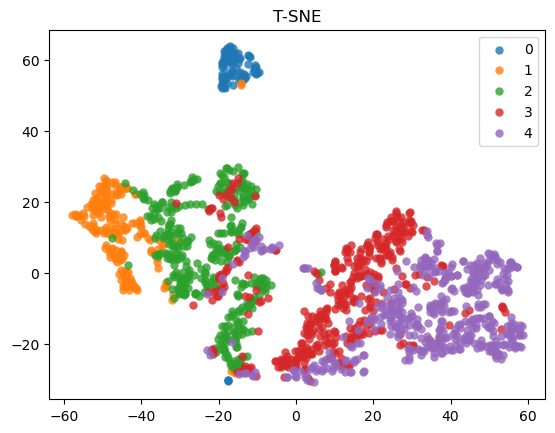
example_data_100_T-SNE.png
Confusion matrix (CM)
CM module evaluates classification accuracy by computing the confusion matrix with each row corresponding to the true class
Parameters |
Optional |
Descripton |
-i, —input |
filename path |
dataframe path (CSV format) |
—format |
png, pdf |
Picture format |
—model_path |
filename path |
Model file path (joblib) |
-n, —feature_number |
int |
feature number |
-o, —output |
directory |
Output directory (default:Current directory) |
CM example
# $Feature_scML automl -i example.csv -c svm -m fscore
$Feature_scML plot CM -i example_fscore_data.csv -n 100 --model_path example_100_svm.joblib
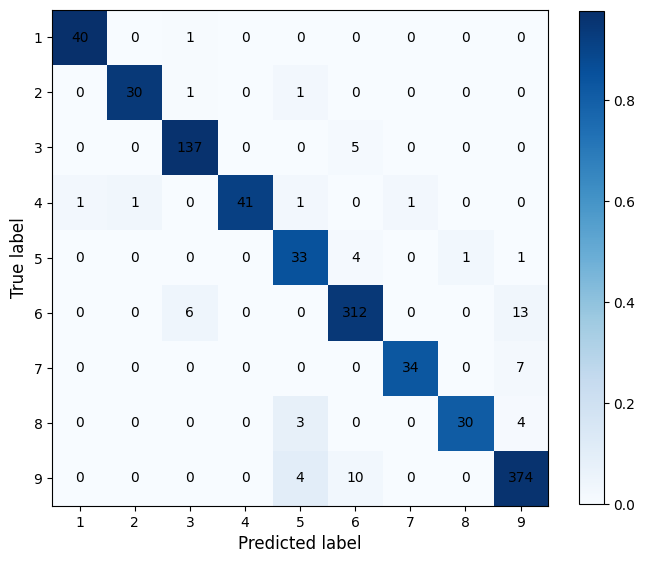
confusion_matrix_example_fscore_data_100.png